
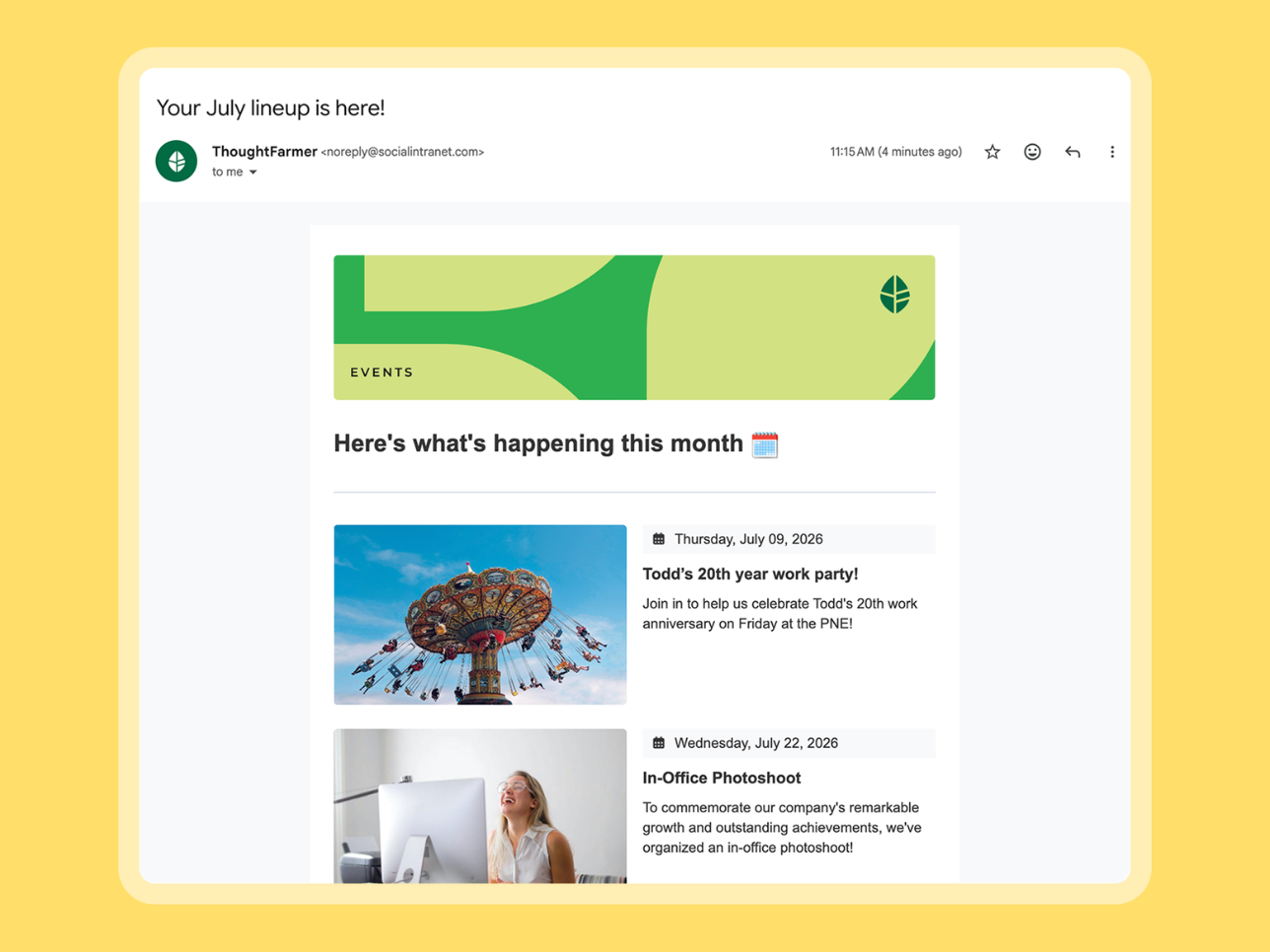


With Employee Newsletter, the news, events, and updates you’ve already published on ThoughtFarmer can become a branded email in minutes. Send it to the groups who need it, and every link brings people back to your intranet for the full story. It’s included in every ThoughtFarmer subscription, with no IT setup required.
One send, two wins: employees who might’ve missed the update on your intranet are in the loop, and your intranet gets a little more of the traffic it deserves.

What does ThoughtFarmer’s Employee Newsletter do?
Employee Newsletter lives in the ThoughtFarmer Broadcast Center, alongside the tools you already use to communicate with your team.
- Start building in seconds using pre-made templates, including The Editorial, Event Invite, or Employee Spotlight, or create from scratch
- Pull in pages or news posts already on your intranet to combine them into a single send
- Easily customize by updating images, editing text, adjusting the layout
- Send to specific security groups or individuals, right away or scheduled for later
- Save a draft, duplicate a past send, or turn any newsletter into a reusable template

Plus, once the email is sent, you can access analytics to see how it performed: opens, total clicks, unique clicks, and clicks per item, so you know what people actually read. For teams coming from a basic email tool with no tracking at all, that visibility alone is a big step up.

Customers who’ve made the switch notice the difference right away.
What customers say about Employee Newsletter
DUCA Financial Services Credit Union had been sending its employee newsletter for years with no way to see what landed. Here’s how their communications lead describes the switch to Employee Newsletter.
The newsletter is incredibly easy to put together. The learning curve wasn’t steep at all, and I really appreciated that.
— Claudia Garcia, Senior Manager of Employee Communications & Events at DUCA Financial Services Credit Union
Read more about DUCA’s success with ThoughtFarmer.
We’d been sending our newsletter for years with no way to know if it landed. Now the dashboard shows us open rates and exactly which stories get clicked. ThoughtFarmer knocked it out of the park.”
— Claudia Garcia, Senior Manager of Employee Communications & Events at DUCA Financial Services Credit Union
The problem Employee Newsletter solves
When we talked to customers, common patterns kept showing up. Organizations were building newsletters by hand with someone doing their best to design it even though they aren’t a designer. Teams were bolting on (and paying extra for!) tools, such as Mailchimp and Constant Contact to reach employees’ inboxes. Both technically work, in the sense that the email goes out. However, neither connects back to the intranet, and both are a headache to maintain in the long run.
The solution: ThoughtFarmer already gives you two ways to share updates: the automated digest, which surfaces your most-read content, and the custom broadcast, for time-bound, urgent updates. Employee Newsletter adds a third: full control over what goes out, pulled straight from what’s already on your intranet.
Comparing your options? Our employee newsletter software buyer’s guide shows how built-in tools like Employee Newsletter stack up against standalone platforms.
Employee Newsletter: before and after
| Before | After |
|---|---|
| Copy content from the intranet into a separate email tool by hand | Pull intranet pages directly into the newsletter builder in a platform you’re already familiar with |
| Manage two subscriber lists across two platforms | Send to your existing ThoughtFarmer security groups |
| Pay monthly for a separate newsletter tool | Included in your ThoughtFarmer subscription |
| Send from Outlook with no open or click tracking | Click-through tracking for every content item to easily see what resonates |
| Let an automated digest decide what goes out | Full control over what gets sent and when |
How teams can use Employee Newsletter
Here are a few practical ideas for how you can use Employee Newsletter:
- Weekly company updates. Build from the Editorial template, pull in the CEO’s latest post, an upcoming event, and a team spotlight, then schedule it for Monday morning
- Department-specific sends. Each team or location sends its own newsletter, with its own branding and content, to just the people it’s for, then checks per-item clicks to see what actually landed
- Compliance reminders. HR sends a targeted newsletter to one department with direct links to the relevant policy pages
- New employee onboarding. Build from the Employee Spotlight template, with links to the resource pages new hires actually need
- All-hands announcements. Use the Event Invite template to announce a town hall and link straight to the agenda
Employee Newsletter is included in your subscription, no extra cost
We built Employee Newsletter to be part of the intranet you already have, not a separate purchase. It’s included in your ThoughtFarmer subscription. No extra software, no added licensing cost, no IT setup required. If you’ve been using the news feed or a third-party tool as a workaround, this is built to replace it.
Employee Newsletter FAQ
Is Employee Newsletter included in my ThoughtFarmer subscription?
Yes. Like all of our features, Employee Newsletter is part of your ThoughtFarmer subscription at no added cost.
Does Employee Newsletter require any setup from IT?
No. Unlike other tools, there’s nothing to whitelist and nothing to configure before you send.
I already use an external newsletter tool. Should I switch?
If you’re currently using Mailchimp, Constant Contact, or a manual Outlook process to reach employees, yes, it’s worth trying. You’ll get the same newsletter capability without paying for and maintaining a second platform. Our buyer’s guide to employee newsletter software breaks down the tradeoffs in more depth if you want the full picture.
Can I test Employee Newsletter before rolling it out to my whole organization?
Yes. Send a draft to yourself, check how it renders, then expand to the full list once you’re happy with it.
Get started with Employee Newsletter
If you’re still comparing intranet platforms and want to see how newsletter features stack up more broadly, our guide to employee newsletter software breaks down what to look for.
Book a demo to see Employee Newsletter as part of the full ThoughtFarmer platform.


